Netflix-Bibliotheken variieren stark von Land zu Land – das, was in den USA verfügbar ist, unterscheidet sich von dem in Großbritannien, Japan oder Brasilien. Die Wahl des VPNs für Netflix schaltet globale Inhalte frei, indem Ihre Verbindung über Server in verschiedenen Regionen geleitet wird, sodass es so aussieht, als würden Sie von diesem Standort aus streamen. Allerdings erkennt und blockiert Netflix viele VPNs aktiv, und selbst wenn ein VPN funktioniert, können langsame Geschwindigkeiten Ihr Seherlebnis mit endlosem Puffern ruinieren.
Netflix Bibliotheken variieren erheblich je nach Land – was in den USA verfügbar ist, unterscheidet sich von dem in Großbritannien, Japan oder Brasilien. Wenn Sie auswählen, welches VPN für Netflix verwendet werden soll, werden globale Inhalte freigeschaltet, indem Ihre Verbindung über Server in verschiedenen Regionen geleitet wird, sodass es so aussieht, als würden Sie von diesem Standort aus streamen. Allerdings erkennt und blockiert Netflix aktiv viele VPNs, und selbst wenn ein VPN funktioniert, können langsame Geschwindigkeiten Ihr Seherlebnis durch endlose Pufferung ruinieren.
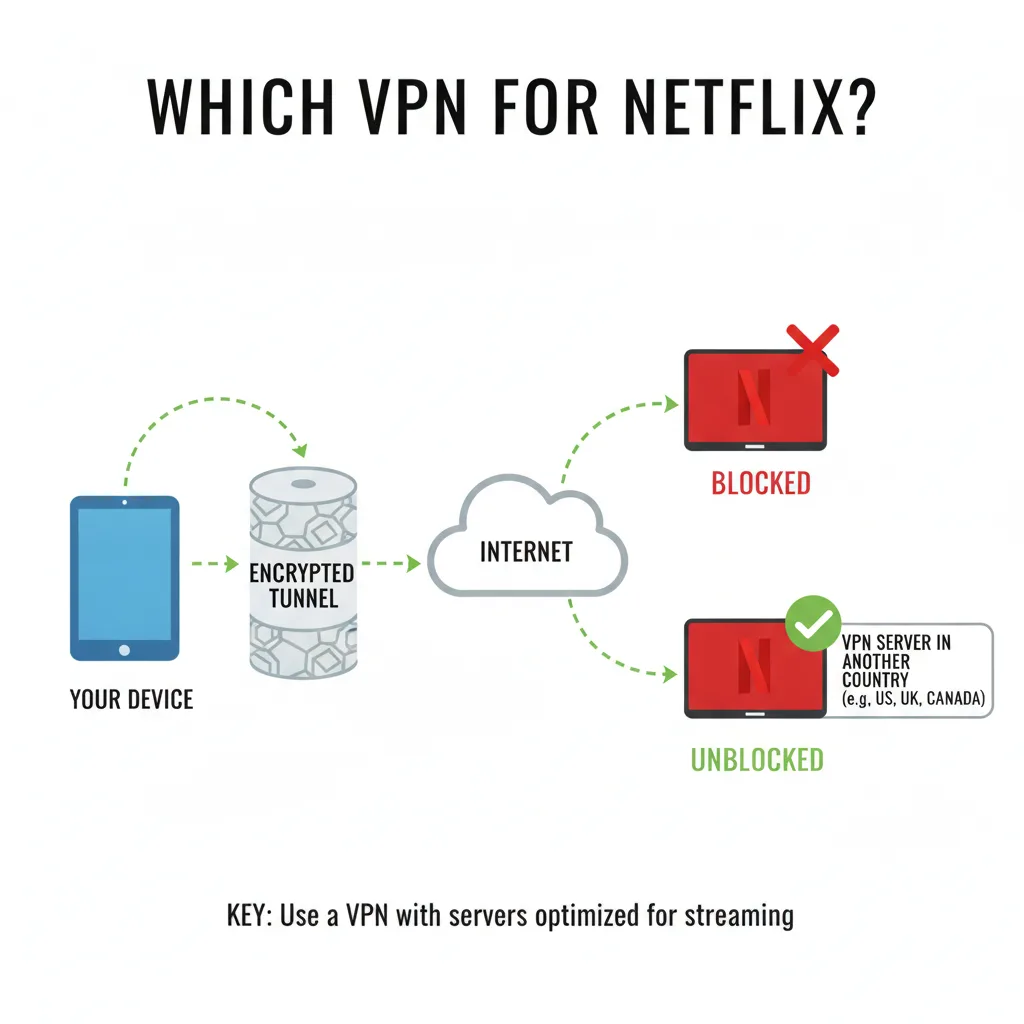
Das richtige VPN für Netflix hängt von mehreren Faktoren ab: konsequente Umgehung der Erkennungssysteme von Netflix, schnelle Streaming-Geschwindigkeiten, Serverstandorte, die zu den gewünschten Bibliotheken passen, und zuverlässige Apps auf Ihren Geräten. Dieser Leitfaden führt Sie durch die Auswahlkriterien, hebt die besten VPN-Optionen für Netflix im Jahr 2026 hervor und zeigt Ihnen, wie Sie Ihre Verbindung einrichten und Fehler beheben.
Probieren Sie Fubble VPN für schnelles, zuverlässiges Netflix Streaming mit WireGuard-betriebenen Verbindungen und Unterstützung für mehrere Geräte.
Wichtige Erkenntnisse
- Netflix blockiert aktiv viele VPNs – wählen Sie Anbieter mit dedizierten Streaming-Servern und häufigen IP-Adressaktualisierungen, um einer Erkennung zu entgehen.
- Geschwindigkeit ist entscheidend für die Streaming-Qualität – VPNs, die WireGuard oder IKEv2 Protokolle verwenden, minimieren die Pufferung und unterstützen 4K-Streaming, wenn Ihre Basisverbindung dies zulässt.
- Serverstandorte bestimmen die zugänglichen Bibliotheken – USA, Großbritannien und Japan bieten die beliebtesten exklusiven Inhalte; Das Servernetzwerk Ihres VPN bestimmt, auf welche Regionen Sie zugreifen können.
- Die Budgetspanne variiert stark – rechnen Sie mit 3–12 $/Monat für zuverlässige kostenpflichtige VPNs; kostenlose VPNs werden häufig von Netflix blockiert und führen zu Datenbeschränkungen.
- Die Nutzung eines VPN für Netflix verstößt gegen deren Nutzungsbedingungen, ist aber in den meisten Ländern nicht illegal; Eine Kontosperrung ist selten, aber möglich.
Warum Netflix VPNs blockiert (und was das für Sie bedeutet)
Netflix investiert viel in die Erkennung des VPN-Verkehrs, da Lizenzvereinbarungen die Verfügbarkeit von Inhalten je nach Region einschränken. Wenn Sie verstehen, warum und wie Netflix VPNs blockiert, können Sie einen Anbieter auswählen, der der Erkennung immer einen Schritt voraus ist.
Netflixs Erkennungsmethoden
Netflix identifiziert VPN-Benutzer hauptsächlich durch IP-Adress-Blacklisting. Wenn mehrere Konten von derselben IP-Adresse aus eine Verbindung herstellen – was bei VPN-Servern üblich ist, auf denen Hunderte von gleichzeitigen Benutzern gehostet werden – markiert Netflix diese IP als zu einem VPN oder Proxy gehörend. Sobald er auf die schwarze Liste gesetzt wurde, sieht jeder, der sich über diesen Server verbindet, den berüchtigten Fehler: „Sie scheinen einen Unblocker oder Proxy zu verwenden.“
Zusätzliche Erkennungsmethoden umfassen die DNS-Leak-Analyse (Prüfung, ob Ihre DNS-Anfragen mit Ihrem scheinbaren Standort übereinstimmen) und Port-/Protokoll-Fingerprinting (Erkennung VPN-spezifischer Verkehrsmuster). Hochwertige VPNs wirken dem mit dedizierten Streaming-IPs, automatischer Serverrotation und Leckschutz entgegen. Testen Sie mit unseren Diagnosetools auf Lecks.
Lizenzvereinbarungen und regionale Inhalte
Inhaltseigentümer verkaufen Streaming-Rechte auf Länderbasis. Ein Filmstudio könnte einen Film an Netflix USA lizenzieren, aber die britischen Rechte an einen anderen Dienst verkaufen. Netflix muss diese geografischen Beschränkungen respektieren oder mit rechtlichen Konsequenzen und beschädigten Studiobeziehungen rechnen. Aus diesem Grund ist *The Office* möglicherweise in den USA, aber nicht in Frankreich verfügbar, oder warum sich die Anime-Bibliotheken zwischen Japan und anderen Regionen unterscheiden.
Wenn Sie ein VPN verwenden, um auf die Bibliothek eines anderen Landes zuzugreifen, umgehen Sie diese Lizenzgrenzen – was Netflix vertraglich verhindern muss, auch wenn die Praxis Benutzern zugute kommt, die rechtmäßig bezahlte Inhalte suchen.
Ist die Verwendung eines VPN für Netflix legal?
Dies ist keine Rechtsberatung. In den meisten Ländern ist die Verwendung eines VPN zum Ansehen von Netflix nicht illegal – Sie raubkopieren keine Inhalte; Sie greifen auf Inhalte zu, für die Sie über ein Abonnement bezahlt haben. Es verstößt jedoch gegen die Nutzungsbedingungen von Netflix. Das praktische Risiko ist gering: Netflix blockiert möglicherweise Ihre VPN-Verbindung oder zeigt in seltenen Fällen eine Warnung an, Kontosperrungen sind jedoch äußerst selten.
Ausführliche rechtliche Überlegungen finden Sie in unserem Leitfaden zu ist die Verwendung eines VPN legal.
Wichtige Funktionen, auf die Sie bei einem Netflix VPN achten sollten
Nicht alle VPNs sind mit Netflix erfolgreich. Konzentrieren Sie sich bei der Bewertung von Optionen auf diese wichtigen Funktionen.
Streaming-optimierte Server
Die besten VPNs unterhalten dedizierte Streaming-Server mit häufig wechselnden IP-Adressen. Diese Server sind speziell so konfiguriert, dass sie die Erkennungssysteme von Netflix umgehen und Videoverkehr mit hoher Bandbreite verarbeiten. Suchen Sie nach Anbietern, die ausdrücklich die Netflix-Kompatibilität bewerben und ihre Server-Infrastruktur regelmäßig aktualisieren.
Schnelle Verbindungsgeschwindigkeiten (WireGuard, IKEv2)
Das Streamen von 4K Netflix erfordert dauerhafte Geschwindigkeiten von 25+ Mbit/s. VPN-Protokolle wirken sich erheblich auf die Leistung aus:
- WireGuard: Modernes, leichtes Protokoll, das nahezu native Geschwindigkeiten mit minimalem Overhead liefert – ideal für Streaming.
- IKEv2: Schnell und stabil, insbesondere auf Mobilgeräten.
- OpenVPN: Zuverlässig, aber langsamer; Für HD akzeptabel, kann aber mit 4K Probleme bereiten.
Fubble VPN verwendet WireGuard, um schnelle, konstante Geschwindigkeiten bereitzustellen, die für hochwertiges Streaming geeignet sind. Erfahren Sie mehr über VPN-Protokolle und deren Auswirkungen auf die Leistung.
Unterstützung mehrerer Geräte
Ihr Haushalt streamt Netflix wahrscheinlich gleichzeitig auf Smart-TVs, Laptops, Tablets und Telefonen. Überprüfen Sie, wie viele gleichzeitige Verbindungen jedes VPN zulässt (normalerweise 5–10 Geräte). Überprüfen Sie auch native Apps für Ihre Plattformen: iOS, Android, Windows, macOS und idealerweise Router oder Smart-TV-Unterstützung.
Servernetzwerk und Netflix Bibliothekszugriff
Die Breite des Servernetzwerks eines VPN bestimmt, auf welche Netflix Bibliotheken Sie zugreifen können. Ein VPN mit Servern in über 30 Ländern bietet Ihnen mehr Inhaltsoptionen als eines, das nur 10 Regionen abdeckt. Priorisieren Sie Anbieter mit mehreren Servern an stark nachgefragten Standorten wie den USA, Großbritannien, Japan, Kanada und den wichtigsten europäischen Ländern.
Zuverlässiger Kundensupport
Wenn die Netflix-Erkennung zuschlägt, benötigen Sie reaktionsschnelle Hilfe. Suchen Sie nach VPNs, die Live-Chat rund um die Uhr oder eine umfassende Supportdokumentation bieten, die Anleitungen zur Fehlerbehebung bei Streaming-Problemen enthält. Der reine E-Mail-Support mit mehrtägigen Reaktionszeiten führt zu frustrierenden Ausfallzeiten.
Top-VPNs, die mit Netflix im Jahr 2026 funktionieren
Diese Anbieter haben nachweislich Erfolge bei der zuverlässigen Umgehung von Netflix-Beschränkungen erzielt und gleichzeitig hohe Geschwindigkeiten und benutzerfreundliche Apps beibehalten. Wir haben sie nach ihren Hauptstärken positioniert, um Sie dabei zu unterstützen, Ihren Prioritäten gerecht zu werden.
Am besten insgesamt: NordVPN / ExpressVPN
NordVPN und ExpressVPN dominieren die Premium-Stufe mit umfangreichen Servernetzwerken (über 5.500 bzw. über 3.000 Servern), konsistentem Netflix-Zugriff über mehrere Regionen hinweg und hervorragenden Geschwindigkeiten. Beide bieten dedizierte Streaming-Server, robuste Apps für alle wichtigen Plattformen und Support rund um die Uhr. Rechnen Sie mit einer Zahlung von 10–13 $/Monat für Monatspläne, mit erheblichen Rabatten auf jährliche Verpflichtungen.
Stärken: Maximale Zuverlässigkeit, größte regionale Abdeckung, Premium-Support. Kompromiss: Höherer Preis als preisgünstige Alternativen.
Beste Budgetauswahl: Surfshark / Fubble VPN
Surfshark bietet Netflix-Kompatibilität für 3–4 $/Monat bei Mehrjahresplänen mit unbegrenzten gleichzeitigen Verbindungen – ideal für Familien oder Power-User mit vielen Geräten. Fubble VPN bietet ähnlich günstige Preise mit WireGuard-basierten Geschwindigkeitsvorteilen und Unterstützung für mehrere Plattformen, was es zu einer ausgezeichneten Wahl für preisbewusste Streamer macht, die nicht auf Leistung verzichten möchten.
Stärken: Erschwingliche Preise, unbegrenzte Geräte (Surfshark), schnelle WireGuard Verbindungen (Fubble VPN). Kompromiss: Kleinere Servernetzwerke als Premium-Konkurrenten; Gelegentliche Erkennung erfordert einen Serverwechsel.
Sehen Sie sich unseren detaillierten Vergleich der kostenlosen vs. kostenpflichtigen VPN-Optionen an, um die Preisunterschiede zu verstehen.
Am besten für den Datenschutz: ProtonVPN
ProtonVPN zieht datenschutzorientierte Benutzer mit seiner Schweizer Gerichtsbarkeit, Open-Source-Apps und einer strengen, von Dritten geprüften No-Logs-Richtlinie an. Es ist zwar etwas langsamer als WireGuard-First-Konkurrenten, bietet aber zuverlässigen Netflix Zugriff auf Server in den USA und Großbritannien. Bei längeren Plänen beginnen die Preise bei etwa 5 $/Monat.
Stärken: Transparente Datenschutzpraktiken, DSGVO-konforme, sichere Kernarchitektur. Kompromiss: Weniger Streaming-optimierte Server als Mainstream-Konkurrenten.
Am besten für mehrere Regionen: Windscribe
Windscribe bietet ein ungewöhnlich breites Servernetzwerk (über 60 Länder) mit starker Netflix-Kompatibilität und eignet sich daher hervorragend für Benutzer, die Zugriff auf weniger verbreitete Bibliotheken wie Südkorea, Indien oder bestimmte europäische Länder wünschen. Mit dem einzigartigen „Build a Plan“-Preismodell zahlen Sie nur für die Standorte, die Sie benötigen.
Stärken: Umfangreiche regionale Abdeckung, flexible Preisgestaltung. Kompromiss: Inkonsistente Geschwindigkeiten auf allen Servern; Einige Standorte funktionieren besser als andere.
Vergleichstabelle:
| VPN | Preis (monatlich) | Geräte | Netflix Regionen | Geschwindigkeit Bewertung |
|---|---|---|---|---|
| NordVPN | ~12 $ | 6 | 15+ | Ausgezeichnet |
| ExpressVPN | ~13 $ | 5 | 20+ | Ausgezeichnet |
| Surfshark | ~4 $ (jährlich) | Unbegrenzt | 10+ | Sehr gut |
| Fubble VPN | ~$5 | 10 | 8+ | Ausgezeichnet |
| ProtonVPN | ~$5 (jährlich) | 10 | 8 | Gut |
| Windscribe | ~$9 | Unbegrenzt | 15+ | Gut |
Für umfassendere Streaming-Anforderungen über Netflix hinaus lesen Sie unseren Leitfaden zum besten VPN für Streaming.
So richten Sie ein VPN für Netflix ein (Schritt-für-Schritt)
Es dauert nur wenige Minuten, Ihr VPN mit Netflix zum Laufen zu bringen. Befolgen Sie diese plattformunabhängigen Schritte und führen Sie bei Bedarf eine Fehlerbehebung durch.
Schritt 1: Wählen Sie ein VPN aus und abonnieren Sie es
Wählen Sie je nach Budget und regionalen Anforderungen einen Anbieter aus den oben genannten Optionen aus. Die meisten VPNs bieten 30-tägige Geld-zurück-Garantien, sodass Sie die Netflix-Kompatibilität risikofrei testen können. Erstellen Sie ein Konto und notieren Sie sich Ihre Anmeldeinformationen.
Schritt 2: Installieren Sie die VPN-App
Laden Sie die native App für Ihr Gerät herunter:
- Desktop: Besuchen Sie die Website Ihres VPN und laden Sie das Installationsprogramm für Windows oder macOS herunter. Installieren und anmelden.
- Mobil: Finden Sie die offizielle App im iOS App Store oder Google Play Store.
- Smart TV/Streaming-Gerät: Einige VPNs bieten Apps für Fire TV, Android TV oder Apple TV an. Andernfalls konfigurieren Sie das VPN auf Ihrem Router so, dass es alle Geräte abdeckt.
Ausführliche Plattformhandbücher finden Sie in unseren Artikeln zur gerätespezifischen Einrichtung.
Schritt 3: Stellen Sie eine Verbindung zum richtigen Server her
Öffnen Sie Ihre VPN-App und wählen Sie einen Server in dem Land aus, auf dessen Netflix Bibliothek Sie zugreifen möchten:
- US Netflix: Stellen Sie eine Verbindung zu einem US-Server her (normalerweise New York, Los Angeles oder Chicago).
- UK Netflix: Wählen Sie einen Server in London oder Manchester.
- Japan Netflix: Wählen Sie einen Server in Tokio aus.
Wenn das VPN Server als „Streaming-optimiert“ oder „Netflix US“ kennzeichnet, verwenden Sie diese. Warten Sie, bis die Verbindung als aktiv bestätigt wird (normalerweise angezeigt durch ein grünes Symbol oder den Status „Verbunden“).
Schritt 4: Netflix Cache löschen und anmelden
Netflix kann Ihren tatsächlichen Standort zwischenspeichern. Vor dem Öffnen von Netflix:
1. Browser-Cache leeren (bei Verwendung eines Webbrowsers) oder das Stoppen der Netflix-App erzwingen (Mobilgerät/TV). 2. Starten Sie die Netflix-App neu oder öffnen Sie sie in einem neuen Browserfenster. 3. Melden Sie sich an und durchsuchen Sie die Bibliothek – Sie sollten jetzt Inhalte aus der Region Ihres VPN-Servers sehen.
Bestätigen Sie Ihre Verbindung, indem Sie unser IP-Prüftool besuchen, um sicherzustellen, dass Ihr angezeigter Standort mit Ihrem VPN-Server übereinstimmt.
Behebung häufiger Probleme
Fehler „Sie scheinen einen Unblocker oder Proxy zu verwenden“:
- Wechseln Sie zu einem anderen Server im selben Land (VPN-IP könnte auf der schwarzen Liste stehen).
- Wenden Sie sich an den Support Ihres VPN, um zu erfahren, welche Server derzeit mit Netflix funktionieren.
- Netflix Cookies löschen und erneut zwischenspeichern.
Langsame Pufferung oder geringe Qualität:
- Stellen Sie eine Verbindung zu einem Server her, der geografisch näher bei Ihnen liegt, um schnellere Geschwindigkeiten zu erzielen.
- Wechseln Sie zu einem weniger überlasteten Server (viele VPN-Apps zeigen die Serverauslastung an).
- Stellen Sie sicher, dass keine anderen Geräte Bandbreite in Ihrem Netzwerk verbrauchen.
Netflix wird geladen, zeigt aber die falsche Bibliothek an:
- Überprüfen Sie die Standortdienste Ihres Geräts und deaktivieren Sie sie (Mobilgerät/TV).
- Stellen Sie sicher, dass Ihr DNS keine Datenlecks aufweist, indem Sie auf unserer Tools-Seite testen.
- Starten Sie Ihr Gerät neu, um alte Standortdaten vollständig zu löschen.
Weitere Informationen zur Streaming-Fehlerbehebung finden Sie in unserem umfassenden VPN- und Streaming-Leitfaden.
Netflix VPN-Leistung: Was Sie erwarten können
VPNs fügen von Natur aus eine Routing-Ebene hinzu, die sich auf die Streaming-Leistung auswirken kann. So sehen realistische Erwartungen aus.
Streaming-Qualität und Pufferung
Ein hochwertiges VPN mit einem WireGuard- oder IKEv2-Protokoll verursacht normalerweise 5–15 % Latenz und kann die Geschwindigkeit im Vergleich zu Ihrer ungeschützten Verbindung um 10–20 % reduzieren. Wenn Ihre Basis-Internetgeschwindigkeit 100 Mbit/s beträgt, können Sie über das VPN mit 80–90 Mbit/s rechnen – mehr als genug für 4K-Streaming (das 25 Mbit/s erfordert).
Protokolle der unteren Ebene wie ältere OpenVPN-Konfigurationen können die Geschwindigkeit um 30–50 % reduzieren, was 4K bei langsameren Basisverbindungen schwierig macht. Aus diesem Grund ist die Wahl eines modernen Protokolls wichtig – die WireGuard-Implementierung von Fubble VPN minimiert diese Leistungseinbußen.
Serverauslastung und Spitzenzeiten
VPN-Server unterliegen unterschiedlicher Auslastung. Während der Streaming-Spitzenzeiten (abends in der Zeitzone des Servers) können beliebte Server langsamer werden, da Hunderte von Benutzern gleichzeitig streamen. Wenn es zu einer Pufferung kommt:
- Versuchen Sie, eine Verbindung zu einer anderen Stadt im selben Land herzustellen.
- Verwenden Sie Server in Regionen mit unterschiedlichen Zeitzonen (stellen Sie beispielsweise außerhalb der US-Hauptverkehrszeiten eine Verbindung zu einem Server an der US-Ostküste von Europa aus her).
- Überprüfen Sie die Serverauslastungsindikatoren Ihrer VPN-App, falls verfügbar.
Mobile vs. Desktop-Erfahrung
Desktop-Browser und -Apps bieten im Allgemeinen das reibungsloseste Netflix-Erlebnis über VPNs, da sie Protokolle effizienter verarbeiten und bessere Diagnosetools bieten. Mobile Geräte funktionieren gut mit modernen VPN-Apps, können jedoch gelegentlich Probleme mit Split-Tunneling oder Verbindungsabbrüchen im Hintergrund haben.
Smart-TVs und Streaming-Sticks stellen die größte Herausforderung dar – viele unterstützen VPN-Apps nicht nativ und erfordern eine Konfiguration auf Router-Ebene. Alternativ können Sie Ihren Laptop über HDMI mit dem Fernseher verbinden und gleichzeitig das VPN auf dem Laptop ausführen.
Kostenlose VPNs vs. kostenpflichtige VPNs für Netflix
Kostenlose VPNs klingen verlockend, funktionieren aber selten mit Netflix. Das Verständnis der Einschränkungen hilft Ihnen, eine fundierte Entscheidung zu treffen.
Warum die meisten kostenlosen VPNs nicht mit Netflix funktionieren
Kostenlose VPN-Anbieter stehen vor zwei unüberwindbaren Hindernissen:
1. IP-Blacklisting: Bei begrenzten Budgets können es sich kostenlose VPNs nicht leisten, ständig IP-Adressen zu wechseln. Netflix identifiziert und blockiert schnell ihre kleinen IP-Pools. 2. Server-Infrastruktur: Kostenlose Dienste drängen Tausende von Benutzern auf eine Handvoll Server, was die Erkennung trivial und die Geschwindigkeiten für Streaming unbrauchbar macht.
Die meisten kostenlosen VPNs legen außerdem Datenbeschränkungen fest (500 MB–10 GB/Monat) – kaum genug für einen einzigen Netflix Film. Für einen detaillierten Überblick über die Risiken kostenloser VPNs lesen Sie Ist ein kostenloses VPN sicher?
Wenn ein kostenloses VPN ausreichen könnte
Das einzige Szenario, in dem kostenlose VPNs für Netflix funktionieren, ist mit Premium-Anbietern, die begrenzte kostenlose Kontingente anbieten, wie zum Beispiel:
- ProtonVPN Free: Keine Datenbeschränkung, aber nur 3 Länder (einschließlich USA) und langsamere Geschwindigkeiten. Netflix Zugriff ist inkonsistent, funktioniert aber gelegentlich.
- Windscribe Free: 10 GB/Monat decken möglicherweise leichtes Streaming ab, die Kompatibilität mit Netflix variiert jedoch.
Selbst diese kostenlosen Stufen garantieren keinen Zugriff auf Netflix. Für den gelegentlichen Gebrauch sind sie einen Versuch wert, für ernsthaftes Streaming ist jedoch ein kostenpflichtiger Plan erforderlich.
Kostenvergleich und Wert
Kostenpflichtige VPNs für Netflix liegen zwischen 3–13 $/Monat, abhängig von der Vertragsdauer:
- Budgetstufe (3–5 $/Monat): Surfshark, Fubble VPN bei Jahresplänen – ausgezeichnetes Preis-Leistungs-Verhältnis für zuverlässigen Netflix Zugriff.
- Mittelklasse (5–8 $/Monat): ProtonVPN, Windscribe – gutes Preis-Leistungs-Verhältnis.
- Premium-Stufe (10–13 $/Monat): NordVPN, ExpressVPN – maximale Zuverlässigkeit und Support.
Im Vergleich zu den Kosten mehrerer regionaler Streaming-Abonnements ist ein VPN für 4–5 $/Monat, das globale Bibliotheken freischaltet, kostengünstig. Detaillierte Preisaufschlüsselungen finden Sie in unserem Artikel zu VPN-Kosten pro Monat.
Beachten Sie auch unseren Leitfaden zum besten kostenlosen VPN für Netflix, wenn Sie nach kostenlosen Optionen suchen.
Regionale Netflix Bibliotheken: Auf welche Länder sollten Sie sich konzentrieren
Verschiedene Netflix Regionen bieten unterschiedliche Inhaltsbibliotheken. Hier sind die beliebtesten Ziele und warum es sich lohnt, darauf zuzugreifen.
| Region | Bibliotheksgröße | Bemerkenswerte Exklusivtitel | Am besten für |
|---|---|---|---|
| Vereinigte Staaten | ~5.500 Titel | Größter Gesamtkatalog, die meisten US-Sender, umfangreicher Film Auswahl | Allgemeine Vielfalt, Neuerscheinungen |
| Vereinigtes Königreich | ~5.000 Titel | Britisches Fernsehen (Doctor Who, Peaky Blinders), verschiedene Filmauswahl | UK-Serien, BBC-Produktionen |
| Japan | ~5.400 Titel | Umfangreicher Anime-Katalog, japanische Filme, Studio Ghibli | Anime-Fans, japanisches Kino |
| Kanada | ~4.900 Titel | Mischung aus US- und UK-Inhalten, einzigartige kanadische Shows | Alternative zu den USA Bibliothek |
| Deutschland | ~4.300 Titel | Europäische Filme, andere Lizenzierung als Großbritannien | Europäisches Kino, deutsche Inhalte |
Strategietipp: Benutzer behalten oft Zugriff auf zwei bis drei Bibliotheken – typischerweise in den USA für Abwechslung, plus Japan für Anime oder Großbritannien für britisches Fernsehen. Das Servernetzwerk Ihres VPN sollte Ihre Prioritätsregionen abdecken.
Der Standort des VPN-Servers, zu dem Sie eine Verbindung herstellen, bestimmt, welche Bibliothek Sie sehen. Wenn Sie eine Verbindung zu einem Server in Tokio herstellen, wird Ihnen Japans Netflix angezeigt, unabhängig davon, wo Sie sich physisch befinden. Dies erleichtert den regionalen Zugriff, sobald Ihr VPN konfiguriert ist.
Rechtliche und ethische Überlegungen
Das Verständnis der rechtlichen Rahmenbedingungen und der Richtlinien von Netflix hilft Ihnen, fundierte Entscheidungen über die VPN-Nutzung für Streaming zu treffen.
Netflix Nutzungsbedingungen
In den Nutzungsbedingungen von Netflix heißt es: „Sie können Netflix-Inhalte hauptsächlich in dem Land ansehen, in dem Sie Ihr Konto eingerichtet haben, und nur an geografischen Standorten, an denen wir unseren Service anbieten und solche Inhalte lizenziert haben.“ Die Nutzung eines VPN für den Zugriff auf Inhalte anderer Regionen verstößt technisch gegen diese Vereinbarung.
Praktische Durchsetzung: Die primäre Reaktion von Netflix auf die VPN-Nutzung ist technische Blockierung, nicht Maßnahmen gegen das Konto. Sie investieren in Erkennungssysteme, sperren Konten jedoch selten nur für die VPN-Nutzung. Das Unternehmen sieht sich dem Druck von Inhaltslizenzgebern ausgesetzt, regionale Umgehungen zu verhindern, ist sich aber auch bewusst, dass viele VPN-Benutzer zahlende Abonnenten sind.
Ist es illegal, ein VPN für Netflix zu verwenden?
Dies ist keine Rechtsberatung. Wenden Sie sich an einen Anwalt, um konkrete Ratschläge zu erhalten. In den meisten Ländern ist die Verwendung eines VPN für den Zugriff auf Netflix nicht illegal. Sie raubkopieren keine Inhalte; Sie greifen über ein kostenpflichtiges Abonnement mit Datenschutztools auf Inhalte zu. Es sind keine Fälle einer strafrechtlichen Verfolgung der Nutzung eines VPN mit Netflix bekannt.
In Ländern mit VPN-Beschränkungen (China, Russland, Vereinigte Arabische Emirate) kann die Verwendung eines VPN jedoch mit rechtlichen Komplikationen verbunden sein, die nichts mit Streaming zu tun haben. Informationen zur länderspezifischen VPN-Legalität finden Sie in unserem Leitfaden zu VPN für China und im weiteren Artikel zur Verwendung eines VPN-Rechts.
Urheberrecht und faire Nutzung
Sie verstoßen nicht gegen das Urheberrecht, indem Sie lizenzierte Inhalte ansehen, für deren Zugriff Sie bezahlt haben, selbst wenn Sie geografische Beschränkungen technisch umgehen. Der Inhalt befindet sich legal auf der Plattform von Netflix – Sie ändern lediglich Ihren scheinbaren Anzeigeort. Dies unterscheidet sich grundlegend von Piraterie, bei der es um den Zugriff auf nicht lizenzierte oder gestohlene Inhalte geht.
Die ethische Überlegung besteht darin, ob die Umgehung von Lizenzgrenzen den Erstellern von Inhalten schadet. Lizenzmodelle sind komplex, aber da Sie für Netflix bezahlen, erhalten die Urheber eine Vergütung durch die Zahlungsvereinbarungen von Netflix mit den Rechteinhabern.
Häufig gestellte Fragen
Kann mir Netflix die Nutzung eines VPN verbieten?
Netflix kann Konten wegen Verstößen gegen die Nutzungsbedingungen technisch sperren, dies kommt jedoch in der Praxis äußerst selten vor. Das Unternehmen konzentriert sich darauf, VPN-Verbindungen zu blockieren, anstatt Benutzer zu bestrafen. Wenn Netflix ein VPN erkennt, wird ein Proxy-Fehler angezeigt und Sie können erst dann streamen, wenn Sie das VPN trennen oder den Server wechseln – Kontosperrungen sind jedoch bei alleiniger VPN-Nutzung praktisch unbekannt.
Welches VPN hat die meisten Netflix Regionen?
ExpressVPN und NordVPN sind führend mit zuverlässigem Zugang zu über 15–20 Netflix Regionen, darunter alle großen Bibliotheken und viele kleinere Märkte. Windscribe bietet die größte Serverabdeckung (über 60 Länder), aber nicht alle Server funktionieren konsistent mit Netflix. Für die meisten Benutzer deckt der zuverlässige Zugriff auf die USA, Großbritannien, Japan und einige europäische Länder 90 % der gewünschten Inhalte ab.
Warum funktioniert mein VPN für andere Websites, aber nicht für Netflix?
Netflix nutzt eine hochentwickelte VPN-Erkennung, die speziell auf den Streaming-Verkehr abzielt. Ein VPN, das Ihren Standort erfolgreich für das allgemeine Surfen maskiert, kann bei Netflix scheitern, da Netflix umfangreiche IP-Blacklists bekannter VPN-Server führt, Verkehrsmuster und Verbindungsmetadaten analysiert, die die VPN-Nutzung aufdecken, und Ihr VPN möglicherweise nicht über dedizierte Streaming-Server verfügt, die die Systeme von Netflix umgehen sollen. Wechseln Sie zu einem VPN mit bewährter Netflix Kompatibilität und Streaming-optimierten Servern.
Unterstützen Smart-TVs VPNs für Netflix?
Einige Smart-TV-Betriebssysteme (Android TV, Fire TV) unterstützen native VPN-Apps, was die Einrichtung unkompliziert macht. Die meisten anderen Smart-TVs (Samsung, LG) unterstützen VPN-Apps nicht direkt – Sie müssen entweder das VPN auf Ihrem Router so konfigurieren, dass es alle Geräte in Ihrem Netzwerk abdeckt, einen Laptop, auf dem das VPN läuft, über HDMI mit Ihrem Fernseher verbinden oder einen Streaming-Stick (Fire TV Stick, Chromecast) verwenden, der VPN-Apps unterstützt.
Kann ich dasselbe VPN für Netflix und andere Streaming-Dienste verwenden?
Ja – VPNs, die gut mit Netflix funktionieren, sind normalerweise auch mit anderen Streaming-Plattformen wie Hulu, Disney+, Amazon Prime Video und BBC iPlayer erfolgreich. Allerdings verfügt jeder Dienst über eigene Erkennungssysteme, sodass gelegentlich ein Serverwechsel erforderlich sein kann. Tipps zur Optimierung für mehrere Plattformen finden Sie in unserem umfassenden Leitfaden zu VPN für Streaming.
Schlussfolgerung
Bei der Auswahl welches VPN für Netflix im Jahr 2026 verwendet werden soll, kommt es darauf an, Zuverlässigkeit, Geschwindigkeit, Serverabdeckung und Budget in Einklang zu bringen. Premium-Optionen wie NordVPN und ExpressVPN bieten maximale Kompatibilität und Support, allerdings zu höheren Preisen. Budgetfreundliche Alternativen wie Surfshark und Fubble VPN bieten ein hervorragendes Preis-Leistungs-Verhältnis mit WireGuard-basierten Geschwindigkeiten und konsistentem Netflix-Zugriff für Benutzer, die keine Premium-Funktionen benötigen.
Konzentrieren Sie sich auf VPNs mit dedizierten Streaming-Servern, modernen Protokollen (WireGuard oder IKEv2) und robusten Servernetzwerken, die Ihre bevorzugten Regionen abdecken. Denken Sie daran, dass sich die Erkennungssysteme von Netflix ständig weiterentwickeln – kein VPN garantiert einen dauerhaften, 100%igen Zugang, aber qualitativ hochwertige Anbieter passen sich schnell an, um die Zuverlässigkeit zu gewährleisten.
Starten Sie das Streaming globaler Netflix-Inhalte noch heute mit Fubble VPN mit schnellen WireGuard-Verbindungen, Multi-Device-Unterstützung und transparenter Leistung. Ganz gleich, ob Sie im Ausland unterwegs sind, exklusive internationale Inhalte suchen oder einfach Zugriff auf den vollständigen Netflix-Katalog haben möchten, für den Sie bezahlen – das richtige VPN macht Streaming nahtlos und frustfrei.